Metrics are collected automatically on every app load and displayed directly in the terminal during the development cycle.
Captured Metrics
| Metric | Type | Description |
|---|---|---|
cls |
Visual stability | Cumulative Layout Shift |
fcp |
Loading speed | First Contentful Paint |
lcp |
Loading speed | Largest Contentful Paint |
load |
Navigation timing | Start of the page load event |
score |
Calculated | Weighted performance score (0–100) |
rating |
Calculated | Human-readable rating based on the score |
CLS — Cumulative Layout Shift
What it measures: Quantifies how much visible content shifts unexpectedly during the page lifecycle. A layout shift occurs when an element changes position between rendered frames without user interaction.
Formula:
layout shift score = impact fraction × distance fraction
Impact fraction — portion of the viewport affected by the unstable element:

Distance fraction — largest distance the element traveled relative to the viewport:

CLS accumulates all unexpected layout shift scores throughout the entire page lifecycle.
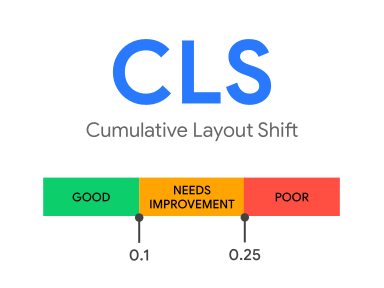
Thresholds (official Web Vitals):
| Rating | Value |
|---|---|
| Good | ≤ 0.1 |
| Needs improvement | 0.1 – 0.25 |
| Poor | > 0.25 |
Eitri target (stricter — optimized for Eitri-App):
| Rating | Value |
|---|---|
| Good | ≤ 0.05 |
| Poor | > 0.1 |
Why it matters: Unexpected shifts cause users to lose their reading position, tap wrong buttons, or perform unintended actions (e.g., accidentally confirming a purchase). Especially critical in Eitri-App, where touch targets are smaller.
FCP — First Contentful Paint
What it measures: Time from navigation start until any content (text, image, SVG, non-white canvas) is rendered on screen for the first time. It is the earliest signal that the page is responding.

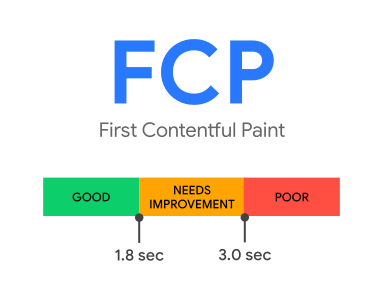
Thresholds (official Web Vitals):
| Rating | Value |
|---|---|
| Good | ≤ 1.8 s |
| Needs improvement | 1.8 s – 3.0 s |
| Poor | > 3.0 s |
Eitri target (stricter — optimized for Eitri-App):
| Rating | Value |
|---|---|
| Good | ≤ 800 ms |
| Poor | > 1800 ms |
Why it matters: FCP is the user's first visual confirmation that something is happening. A slow FCP increases perceived wait time and abandonment rates, even if the page eventually loads fully.
LCP — Largest Contentful Paint
What it measures: Render time of the largest visible element in the viewport (image, text block, video poster). Marks the point at which the page's main content has likely been loaded.
Real-world examples of LCP elements across different sites:


Considered elements:
<img>(including the first frame of animated images)<image>inside<svg><video>(poster or first frame, whichever comes first)- Elements with CSS
background-image: url() - Block-level elements containing text content
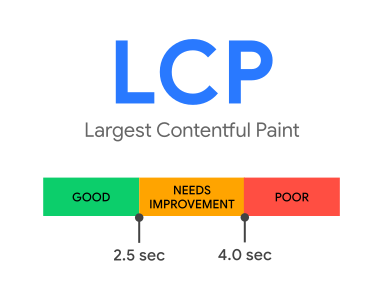
Thresholds (official Web Vitals):
| Rating | Value |
|---|---|
| Good | ≤ 2.5 s |
| Needs improvement | 2.5 s – 4.0 s |
| Poor | > 4.0 s |
Eitri target (stricter — optimized for Eitri-App):
| Rating | Value |
|---|---|
| Good | ≤ 1000 ms |
| Poor | > 2500 ms |
Why it matters: A fast LCP signals to the user that the page is useful and ready for interaction. It directly correlates with perceived loading performance and is the Core Web Vital with the highest impact on user retention.
LOAD — Page Load Event
What it measures: Time (in ms) from navigation start until the load event fires in the application. Indicates that all synchronous resources (scripts, stylesheets, images referenced in JSX) have finished loading.
This is a navigation timing metric, not a Core Web Vital. It is captured for diagnostic purposes — a slow
loadcombined with a fastLCPmay indicate heavy deferred resources.
Score (0–100)
The score is a single weighted number summarizing the three captured CWV metrics. It follows a logarithmic scale aligned with the Lighthouse scoring model, where the relationship between the raw metric value and the score is non-linear — improvements have more impact the closer values already are to the "good" threshold.
Weights:
| Metric | Weight |
|---|---|
| LCP | 35% |
| CLS | 35% |
| FCP | 30% |
Per-metric formula:
metricScore = (log(poor) - log(value)) / (log(poor) - log(good))
              clamped to [0, 1] × 100
Metrics that were not captured are excluded from the weighted average, with the remaining weights automatically renormalized.
Final score:
score = round(Σ(metricScore × weight) / Σ(weight))
Rating
| Rating | Score range | Meaning |
|---|---|---|
good |
≥ 90 | App meets high-performance targets |
needs-improvement |
50 – 89 | Noticeable issues affecting the user experience |
poor |
< 50 | Significant performance problems |